
Getting started
Installing and signing in
Install the app from the store for your device:


Open the app. On the Connect your account screen, choose where your company's MicroPowerManager runs and press Continue:
Option Choose it when Demo You want to try the app with sample data. Cloud Your company uses MicroPowerManager Cloud. This is the usual choice. Custom Your company runs its own MicroPowerManager server. Ask your administrator for the Server URL. For Custom, enter the full address starting with
https://, for examplehttps://mpm.example.com. Do not add/apiat the end; the app adds it.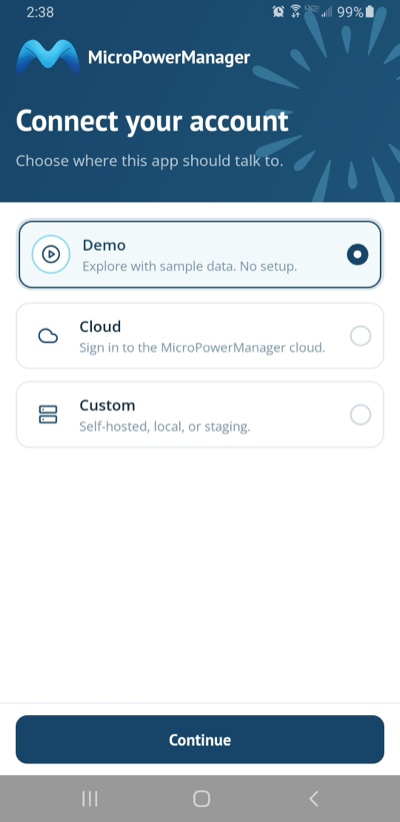
Enter the Email and Password your administrator gave you and press Sign in.
You stay signed in until you sign out.
Forgot your password? The app cannot reset it. Ask your administrator to set a new one (see Changing an agent's password).
Connected to the wrong server? Sign out (see Settings), then press Wrong server? Change on the sign-in screen.
Getting around
The bar at the bottom of the screen has four tabs:
| Tab | What it is for |
|---|---|
| Home | Your day at a glance: money collected and your balance. |
| Customers | Find, register and manage your customers. |
| Sales | The solar home systems you have sold and their payment plans. |
| Payments | Every payment you have collected. |
The orange "➕" button on Home is the quickest way to start work. It offers Collect payment, Sell SHS and Register customer.
Settings
Open Settings with the menu icon at the top right of Home. It shows your name, village and mini-grid, and lets you:
- change the app Language,
- check whether your work has been synced to the server (see Working offline),
- Sign out.
The app version is shown at the bottom of the screen. Mention it when you report a problem.
Home

- COLLECTED TODAY is the total of all payments you recorded today.
- Payments today is how many payments that was.
- Balance is the company money you are currently holding. It goes up with every cash payment and sale, and goes down when you hand money over at headquarters. If it reaches your limit, the app stops you collecting cash until you settle up. See Commission and balance for how the balance, commission and limit work.
- YOUR DAY lists today's payments and sales.
Pull the screen down to refresh it.