
SMS/Messages
SMS is the key communication infrastructure. It is used during Transactions and Maintenance requests. Headquarter staff can therefore send SMS to customers, agents and service providers via the website interface. Furthermore, it can also be used by the company to reach out to its entire (or part of its) customer base, in instances such as wanting to inform on a specific event (such a planned/unplanned electricity cut in case of mini-grid operation, or a marketing campaign). That is the reason why SMS is listed in the sidebar as an extra service.
The manager/admin can send SMS's to the customers of a specific Mini-Grid, to a specific customer group/type or single customers.
SMS Gateway Options
MicroPowerManager supports multiple SMS gateway options:
- AfricasTalking - Traditional SMS provider with wide coverage across Africa
- TextBee SMS Gateway - Cost-effective solution using your own Android device
SMS Gateway Setup Guides
Choose your preferred SMS gateway and follow the detailed setup guide:
TextBee SMS Gateway (Cost-Effective)
TextBee allows you to use your own Android device as an SMS gateway, providing up to 98% cost savings compared to traditional SMS providers.
Key Features:
- Up to 98% cost savings
- Uses your own Android device
- Bidirectional SMS (send and receive)
- Free plan: 300 messages/month
- Pro plan: 5,000 messages/month
👉 Complete TextBee Setup Guide
AfricasTalking (Recommended for High Volume)
AfricasTalking provides reliable, high-volume SMS delivery with wide coverage across Africa and detailed analytics.
Key Features:
- High-volume capacity (1000+ messages/month)
- 99.9% uptime guarantee
- Detailed delivery reports
- Wide coverage across Africa
- Additional services (USSD, Voice, Airtime)
👉 Complete AfricasTalking Setup Guide
Configuring Your SMS Gateway
After enabling and configuring one or more SMS gateway plugins, you must select which gateway to use for sending messages.
Setting Your Preferred SMS Gateway
- Navigate to Settings → Configuration → Main Settings
- Scroll to the SMS Gateway dropdown field
- Select your preferred gateway from the available options:
- Africa's Talking - Available when the AfricasTalking plugin is enabled
- TextBee SMS Gateway - Available when the TextBee plugin is enabled
- Viber Messaging - Available when the Viber plugin is enabled
- Click Save to apply your selection
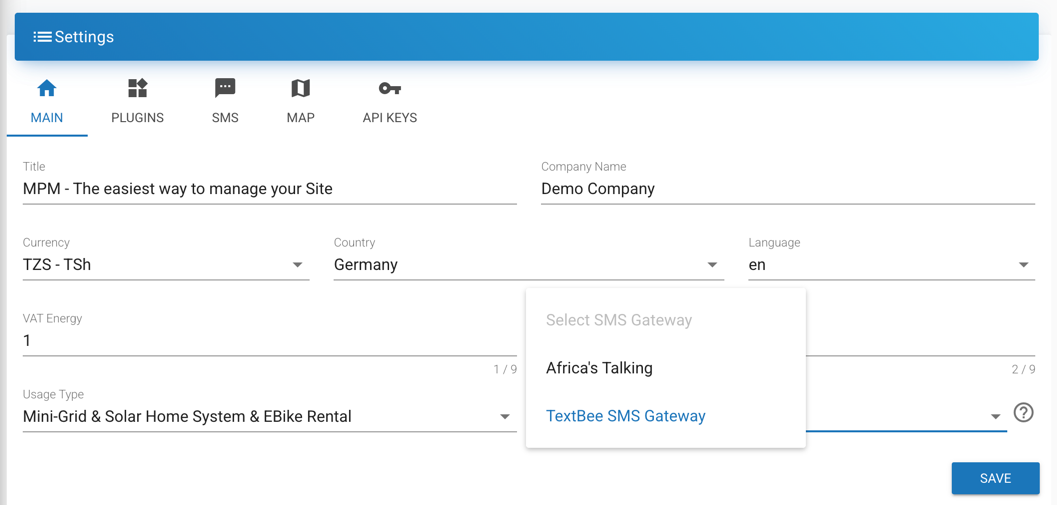
Important: You must have at least one SMS gateway plugin enabled and configured before you can select it in the settings. The dropdown will only show gateways that are currently active.
Choosing the Right SMS Gateway
Use AfricasTalking if
- You need high-volume SMS delivery (1000+ messages/month)
- You require guaranteed delivery rates
- You need delivery reports and analytics
- You have budget for per-message costs
Use TextBee SMS Gateway if
- You want to minimize SMS costs (up to 98% savings)
- You have a reliable Android device available
- Your message volume is moderate (under 5000/month)
- You want full control over your SMS infrastructure