
ECREEE e-Tender Integration Setup Guide
This guide provides step-by-step instructions to set up the integration between MicroPowerManager (MPM) and the ECREEE e-Tender platform for milestone-based progress tracking and disbursement verification.
Overview
The ECREEE e-Tender platform enables transparent management and monitoring of energy project tenders, including milestone validation and payment disbursements.
This integration allows ECREEE e-Tender to securely retrieve transaction and operational data from MicroPowerManager, supporting:
- Milestone verification
- Performance-based disbursement
- Financial transparency
- Automated reporting
Prerequisites
Before starting, ensure the following:
- Active ECREEE e-Tender bidder account
- Access to a MicroPowerManager instance with transaction data
- Admin access to MicroPowerManager to enable the integration plugin
- Ability to generate API keys in MicroPowerManager
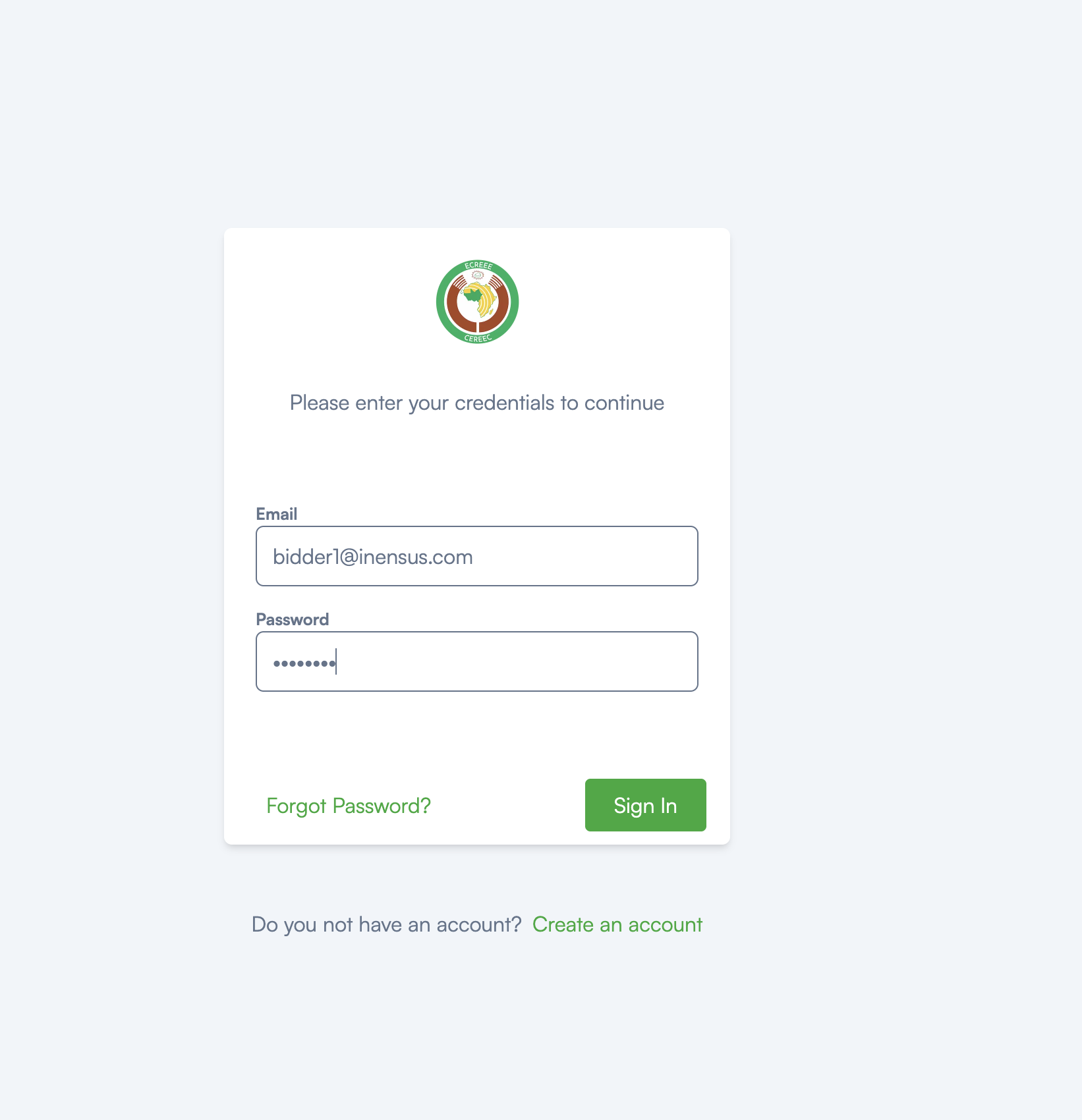
Step 1: Access ECREEE e-Tender Platform
- Navigate to the ECREEE e-Tender login page
- Enter your registered email and password
- Click Sign In to access your dashboard
Step 2: Enable ECREEE e-Tender Plugin in MicroPowerManager
Before ECREEE e-Tender can access your data, the integration plugin must be enabled in MicroPowerManager.
- Log in to your MicroPowerManager instance
- Navigate to Settings → Configuration → Plugins
- Locate the ECREEE E-Tender plugin
- Toggle the plugin ON
Step 3: Generate API Key in MicroPowerManager
To allow secure data access:
- In MicroPowerManager, go to Settings → API Keys
- Click Generate New API Key
- Copy and securely store the generated API key
This API key grants access to transaction and operational data.
Do not share it publicly.
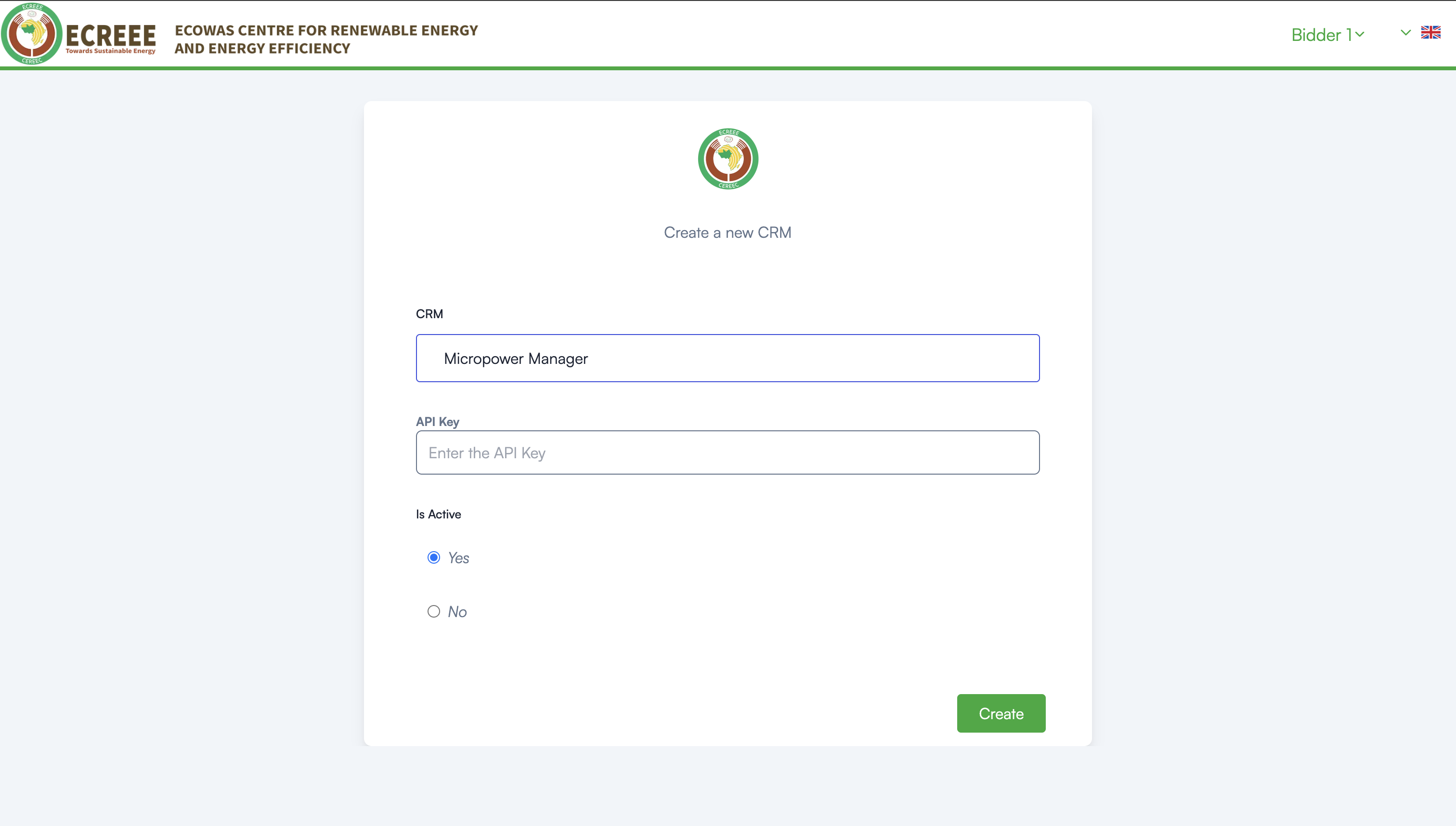
Step 4: Register MicroPowerManager in ECREEE e-Tender (CRM Setup)
- In the ECREEE e-Tender dashboard, navigate to CRM Management
- Click Create New CRM
- Fill in the following fields:
- CRM: Select
Micropower Manager - API Key: Paste the API key generated in Step 3
- Is Active: Select Yes
- CRM: Select
- Click Create to save the configuration
Step 5: Verify Integration
Once the CRM is created and active:
- ECREEE e-Tender will automatically begin retrieving data from MicroPowerManager
- Navigate to relevant tender or milestone views
- Confirm that transaction and progress data is visible
Data synchronization occurs automatically based on ECREEE e-Tender schedules.
How the Integration Works
- ECREEE e-Tender securely authenticates using the provided API key
- Embedded integration services query MicroPowerManager for:
- Payment transactions
- Customer and site references
- Meter and device identifiers
- Timestamps and amounts
- Retrieved data is used to:
- Validate milestone completion
- Support disbursement approvals
- Enhance reporting and auditability
⚙️ API queries are optimized for performance and reliability.
Troubleshooting
No Data Visible
- Confirm the plugin is enabled in MicroPowerManager
- Ensure the API key is correct and active
- Verify that transaction data exists in MPM
Authentication Errors
- Regenerate the API key in MicroPowerManager
- Update the key in ECREEE e-Tender CRM configuration
Incomplete Data
- Check that transactions fall within the expected reporting period
- Confirm site or project mappings in MicroPowerManager
Support
For assistance:
- ECREEE e-Tender issues: Contact the ECREEE platform administrator
- MicroPowerManager issues: Review system logs or contact the MPM support team
This integration enables secure, automated, and transparent data exchange between MicroPowerManager and ECREEE e-Tender, supporting performance-based project financing and milestone-driven disbursements.